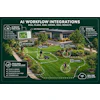
OutdoorBrite is a browser-based AI design tool for landscape contractors. A contractor photographs a client’s yard, picks a style, and gets realistic redesign concepts of that exact property in under a minute. There is no CAD software to learn and nothing to install. It runs on the phone or tablet the contractor already carries.
The tool is built around one moment in the design-installation sales cycle: the first site visit. Most clients cannot picture a finished project from a plan drawing or a portfolio photo of someone else’s yard, so bids stall while the client thinks it over, and mockups drawn back at the office eat unbilled hours the client may reject anyway. OutdoorBrite moves that conversation onto the property itself. The client reacts to a rendering of their own house, their own fence line, and their own trees while the contractor is still standing next to them.
How it Works
- Photograph the space. Backyards, front yards, patios, pool areas, and planting beds all work. The photo can be taken or uploaded from any phone, tablet, or laptop.
- Pick a style. Presets include modern, cottage, xeriscape, tropical, Mediterranean, and Japanese-inspired designs, among others.
- Review the concepts. OutdoorBrite generates several variations of the same space, each based on the uploaded photo of the actual property, usually in under a minute.
- Compare and share. A before-and-after slider shows each concept against the original photo, and any design can be saved or shared with the client by link.
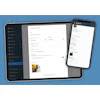
 The OutdoorBrite editor, screenshot. After the first concepts are generated, changes are made by describing them in plain language.OutdoorBrite
What it Means for a Contractor
The render replaces the slowest part of the sale. A mockup that used to take hours at a desk now takes about a minute on-site, and the client’s changes of mind happen during the sales conversation instead of after the bid goes out. When a client asks “what would it look like with pavers instead of the lawn,” the answer is a new concept on the spot, not a follow-up appointment.
Contractors also use the renders downstream of the first visit:
- In written proposals, where a picture of the client’s own yard carries more weight than a stock photo or a 2D plan
- To settle style disagreements between spouses or partners before work is quoted
- To upsell adjacent work, since a full-yard concept often shows the client more than the project they originally called about
Designs made on the Pro plan carry commercial rights, so renders can be used in client proposals and marketing.
OutdoorBrite is available now at outdoorbrite.com. It is a paid product with monthly plans; each plan includes a set number of design generations per month (30 on Starter, 120 on Plus, 400 on Pro). Commercial use for client work is included on the Pro plan. There is no free tier.